

 Here how I did it (thanks to Scraperfect's Blog):
1. Using the "A" text tool on left, write a sentence. Using the Spiral, draw a spiral.
2. Select both (edit --> select all). Go to top menu and choose TEXT--> Put on Path.
3. To remove the spiral line, Go to top menu Object---> Fill and Stroke. Then click Stroke Paint and check NO PAINT. (I didn't click NO PAINT, so you can see the lines on mine.)
4. Save it. It saves as a .svg format. To change the file format, export and choose .png format. You can change the resolution (dpi) to 300 if you want to print it. The resolution is fine for the internet. Open it, chang the format to jpeg, and save it.
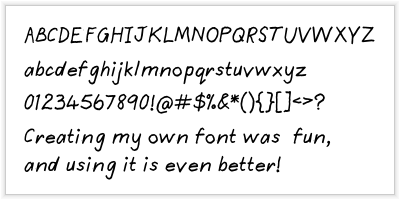
Your Fonts - turn your own handwriting into a font ($7.50) An example from their site -
Spell with Flickr - get help designing your own words. Here's a nice one:
 Just type in the word/words and the site will create it for you. You can change a letter by clicking on it. I captured it off the site, so I'm not sure if you can save the whole word or each letter.







 Posts
Posts












4 comments:
LOVE IT!!! So fun!
Thanks so much for sharing darling :) I love the "spelling with flicker"!
Oh, thank you for adding to the things I can do to avoid writing lesson plans. :) Procratinators UNITE!
Ooooh, goodies! Thanks!!
Post a Comment